

robots.txt says welcome. Does /llms.txt exist?
A practical checklist for llms.txt and llms-full.txt | what belongs
in each file, and how to validate both on the tab you have open.
You open robots.txt. GPTBot is allowed. You feel done.
Then someone curls https://yoursite.com/llms.txt and gets a 404.
That gap | robots allow vs machine-readable agent map missing | is the
discoverability miss. It is the follow-up promised at the end of
What GPTBot sees before your React app hydrates: what belongs in /llms.txt, how it differs from llms-full.txt, and
how to validate both without a cloud crawl.
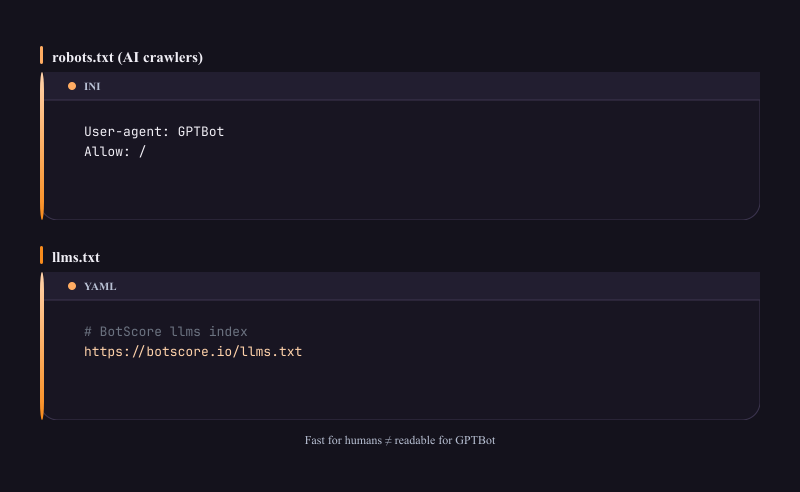
/llms.txt is still missing.
Why this file exists at all
GEO (Generative Engine Optimization) is about making pages legible to AI crawlers and answer engines, not only traditional search rankings. Discoverability is one slice of that: whether agents can find a short, structured summary of your site and the URLs you want them to treat as authoritative.
robots.txt answers “may you fetch?”
llms.txt answers “here is what we are, and where to read next.”
Neither file replaces semantic HTML, JSON-LD, or fixing empty CSR shells. They sit upstream of those checks: if the bot never finds a map, the rest of the audit is harder to act on.
BotScore measures discoverability among its 27 deterministic rules | including presence and
structure for llms.txt / llms-full.txt, plus AI bot robots rules | on
the page in your active tab. Audits run locally; page content is not uploaded to BotScore
servers. When you run an audit, the extension may fetch same-origin /llms.txt,
/llms-full.txt, and /robots.txt from the site you are viewing, the
same way your browser would.
Checklist: ship /llms.txt first
Treat this as a ship checklist, not a style guide for every industry.
1. Presence at the site root
-
File is reachable at
https://your-origin/llms.txt(site root, not a nested CMS path) -
Response is
200with a text body (not an HTML soft-404, not a login wall) -
File is allowed by
robots.txtfor the AI bots you care about (an allow in robots + a 404 on llms.txt is still a fail)
BotScore signal: missing file → discoverability issue
(DIR-LLMS-PRESENCE family). Scene hook from the X teaser:
robots.txt says GPTBot is welcome; /llms.txt still 404s.
2. Structural layout agents can parse
Keep the first screen of the file boring and scannable:
| Element | Why |
|---|---|
Optional YAML frontmatter (--- … ---) |
Metadata block (name, url, contact) when the file is more than a stub |
# Site name (H1) |
Clear top-level identity |
> One-line summary |
Short blockquote agents can quote as the site pitch |
## sections |
Group URLs (Product, Docs, Blog, Legal, Contact…) |
Markdown links [label](url) under each section |
Authoritative destinations, not prose essays |
BotScore signal: structural checks warn/info when H1, summary, sections, links, or (for longer files) frontmatter are missing. You do not need a cloud crawler to see those gaps | open the site, run the local audit.
3. Content that belongs (and what does not)
Belong in llms.txt:
- Product home, pricing/FAQ entry points, canonical docs hubs
- Blog index + flagship posts you want agents to cite as owned explainers
- Legal: privacy, terms, refund when those pages are public
- Contact (email or form URL)
Keep out (or keep tiny):
-
Entire knowledge bases pasted inline (that is what
llms-full.txtis for) - Marketing slogans that contradict FAQ/privacy
- Tracking pixels, JS, or HTML wrappers | this is a text file
Example pattern (live on our site): botscore.io/llms.txt | short product + FAQ pointers + contact, with YAML frontmatter and markdown sections.
llms.txt vs llms-full.txt
/llms.txt |
/llms-full.txt |
|
|---|---|---|
| Role | Short map of authoritative URLs | Expanded documentation link set |
| Priority | Ship this first | Optional, but recommended once the short map exists |
| Length | Keep skim-friendly | Can grow with docs / blog / API surfaces |
| Failure mode | Missing file is a loud discoverability miss | Missing file is a lighter “nice to have” signal |
Rule of thumb: if a new hire could bookmark five links from the short file and
not get lost, llms.txt is done. Put the deeper tree in
llms-full.txt.
Both files use the same structural shape (H1, summary, sections, links). BotScore validates
layout on whichever file is present; llms-full.txt absence is informational when
the short file already exists.
Pair with AI bot robots (do not skip)
A perfect llms.txt does nothing if GPTBot / ClaudeBot / peers are disallowed in
robots.txt.
Checklist:
- Review
User-agentblocks for major AI crawlers you intend to allow - Confirm
Disallowdoes not blanket/for those agents - Re-check after CDN / WAF template changes (templates love to ship “block AI” presets)
BotScore’s discoverability category includes AI bot robots rules alongside the llms files | same local audit pass.
Validate without a cloud crawl
You do not need a SaaS crawler to answer “does this origin ship a usable map?”
Minimum (no install):
curl -sI https://yoursite.com/llms.txt
curl -sI https://yoursite.com/llms-full.txt
curl -s https://yoursite.com/robots.txt | head
On the tab (recommended):
- Open the page on the origin you care about (homepage is enough for root files).
- Install BotScore from botscore.io (Chrome Web Store or Firefox Add-ons).
- Run the audit on the active tab | 27 rules, 0–100 GEO score.
-
Read Bot Discoverability issues for
llms.txt/llms-full.txt/ robots. - Copy the Agent Brief (Markdown) into a ticket; fix; re-audit.
Everything in that loop stays on your device for the audit content. Same-origin fetches for initial HTML, robots, and the llms files happen from the site you opened | not an upload of your HTML to BotScore.
Common failure modes
| Symptom | Likely cause | Fix |
|---|---|---|
404 on /llms.txt |
Never published, or only on a staging host | Add static file at web root; redeploy |
| 200 with HTML body | SPA catch-all routed the path to index.html |
Exclude the path from the client router / serve as static text |
| File exists, audit still warns | No H1 / no sections / no markdown links | Apply structural checklist above |
| robots allow + llms 404 | “We unblocked GPTBot” without shipping the map | Ship llms.txt in the same change as the robots edit |
| Great SEO suite score, weak GEO discoverability | Tools scored rankings / hydrated DOM, not agent maps | Treat llms + AI robots as a separate ship checklist |
How this pairs with DOM drift
If your marketing site is a CSR shell, agents may still fail after they find
llms.txt | the linked pages can be empty in the first HTML response. That is the
prior article’s job
(raw HTML vs Live DOM).
Order of operations that usually pays off:
- Allow the bots you intend to serve (
robots.txt). - Ship
/llms.txt(then optional/llms-full.txt). - Make linked landings agent-readable (landmarks, SSR/SSG where needed, JSON-LD).
- Re-audit the tab before you merge.
Try it on your origin
Free: full 27-rule audit, GEO score, Agent Brief, highlights, CSV | no account.
Pro ($19/mo | $189/yr): PDF export, bulk multi-tab audits, saved custom rules. License
validation hits our server; audit content does not.
Install and details: https://botscore.io