
What GPTBot sees before your React app hydrates
You ship a React app. The page loads, the headings show up, Lighthouse gives you a green SEO score. Looks fine.
Now fetch the same URL the way a lot of bots do — no JavaScript, just the first HTTP response.
Often you get a shell: <div id="root"></div>, a couple of script tags,
maybe a title. The copy your users actually read never appeared in that response.
That split — raw HTML vs Live DOM — is what we call DOM drift. Your app can look perfect in Chrome and still ship an empty document to anything that stops at step one.

The empty #root problem
Most SPAs follow the same sequence: minimal HTML, download JS, mount into
#root, user sees content. Steps three and four happen after the wire transfer.
GPTBot, ClaudeBot, and plenty of other agents fetch the URL, respect
robots.txt, and parse what came back — which is often much closer to that first
HTML than to the tree you inspect in DevTools.
Crawler behavior is not uniform. Googlebot renders JavaScript for indexing (with limits and
delays). Many AI fetchers do not run your bundle at all, or run far less of it. The practical
takeaway for a dev shipping a CSR app:
if your <h1> only exists after hydration, do not assume every agent
saw it.
Typical CSR response:
<!DOCTYPE html>
<html lang="en">
  <head>
    <title>Acme — AI-native analytics</title>
  </head>
  <body>
    <div id="root"></div>
    <script src="/assets/main.js"></script>
  </body>
</html>
After hydration:
<main>
  <h1>AI-native analytics for product teams</h1>
  <p>Track agent-readability alongside human UX…</p>
</main>
Users never notice. Lighthouse might not either — it scores the page once your framework has run. An audit that compares both surfaces will.
You see this on Vite + React SPAs, Vue CLI apps, client-only Next routes. SSR helps, but a
client-only wrapper on one route brings the gap back. Analytics look fine, the SEO category
passes, and the marketing site still curls to an empty shell.
When to care: pricing tables, docs headings, anything you'd be embarrassed to
paste from curl into a ticket. If the proposition lives in JS, it probably isn't
in the initial HTML.
Wrong tool for the job
When “SEO” comes up, teams reach for tools they already have. Each one is useful. None of them diff raw HTML against the hydrated DOM.
| Tool | What it actually tells you |
|---|---|
| Lighthouse | Performance, human a11y, basic meta — on the hydrated page |
| Cloud GEO dashboards | Whether ChatGPT cited your brand this week |
| Site crawlers | Rankings, links, campaigns across the domain |
Lighthouse is great at what it does. Ahrefs and Semrush are great at theirs. BotScore checks something else: llms.txt, AI bot robots rules, landmarks, JSON-LD, and whether the HTML that shipped over the wire matches what Chrome shows after your bundle runs.
If you want to know whether ChatGPT mentioned you yesterday, get a monitoring tool. If you want to fix what GPTBot can read on this tab before you merge, you need a local audit that mirrors crawler constraints.
When live: FAQ — How is BotScore different from Lighthouse?
Side-by-side: raw HTML vs Live DOM
BotScore runs in the browser on the active tab. For DOM drift it fetches initial HTML for the same URL and diffs visible text and landmarks against the Live DOM after hydration.
Try it:
- Open a CSR-heavy page in Firefox (Chrome listing pending as of June 2026 — botscore.io has current store links).
- Open the side panel.
- Toggle Raw HTML and Live DOM.
-
Look for a missing
<h1>, an empty<main>, body copy that only shows up hydrated. - Check Machine Readability in the breakdown — DOM drift failures land there.
In the split view, ask four questions:
- Is there an
<h1>in raw HTML, or only after JS? -
Does
<main>exist in the first response, or is everything inside#rootwith no semantic shell? - Pick a paragraph users can read — same text in the raw panel?
- Primary nav links — real
<a href>in HTML, or injected client-side?
A page can pass three Lighthouse SEO checks and fail all four. That's the point: not another score, a literal diff between what shipped and what Chrome shows.

SEM-DOM-DELTA
We encode this as rule SEM-DOM-DELTA:
- Fetch initial HTML for the active URL.
-
Compare visible text and landmarks (
h1,main, key regions) to the hydrated DOM. - Fail at ~40%+ client-only text, or when structural landmarks are missing from initial HTML.
- Warn at ~15%+.
Fixes depend on your stack: SSR or SSG for headings and body copy, pre-render critical routes at
build time, or move <h1> / <main> into the shell even if
styling still hydrates client-side. SPAs are fine for humans. Agent-readable HTML is a separate
deliverable from “works in Chrome after JS runs.”
Discoverability checks that pair with DOM drift
DOM drift is the loud failure on CSR sites. Agent-readability is wider — BotScore runs 27 rules across five categories. A few that show up alongside drift:
| Check | Why it matters |
|---|---|
| llms.txt / llms-full.txt | Machine-readable site summary for agents |
| AI bot robots | Whether GPTBot / ClaudeBot may fetch your URLs |
| Landmarks | <h1>, <main>, heading hierarchy without CSS layout |
| JSON-LD | Structured context for answer engines |
Example on our site: botscore.io/llms.txt

Follow-ups later: llms.txt checklist, JSON-LD for SaaS landings. This piece stays on the CSR gap.
Score, fix, re-audit
The workflow is tab-native — audit the page you're editing, not a crawl report that lands next week.
- Install from botscore.io (Firefox live; Chrome in review).
- Run an audit — 27 rules, 0–100 GEO score, five categories.
- Read on-page highlights on failing elements.
- Copy Agent Brief — Markdown for a ticket or PR.
- Fix — SSR, meta, llms.txt, robots, landmark HTML.
- Re-audit in the panel.
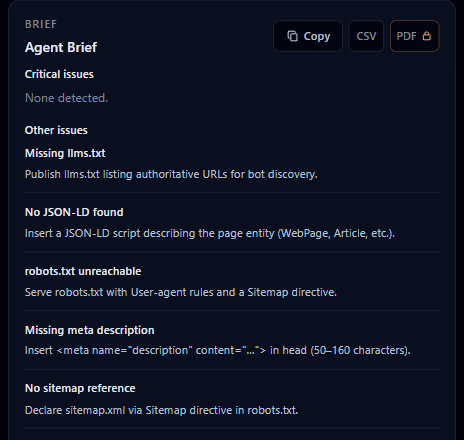
Free: full audit, GEO score, Agent Brief, highlights, CSV — no account. Pro ($19/mo · $189/yr): PDF export, bulk audits (eight tabs), saved custom rules. License check hits our server; audit content does not. No Team tier at launch. This is not a citation-tracking dashboard.
Privacy
Audits run locally in your browser. Page content is not uploaded for scoring. Pro validates your
license key over the network — that's it for BotScore servers. DOM drift checks fetch initial
HTML, robots.txt, and llms.txt from the site you're auditing
(same-origin to that page, not an upload to us). Snapshots stay in browser storage.
Full policy: botscore.io/privacy
The extension is not open source. We do not claim zero network — license validation uses it. We do claim zero telemetry on audit content.
Next steps
Install from botscore.io — Firefox Add-ons is live; Chrome link goes up when Google approves the listing.
If you ship SPAs, treat initial HTML as a first-class artifact. When your
<h1> only appears after createRoot, assume a chunk of agents
never saw it. Run raw vs live on the tab you're about to ship — locally, before the PR merges.
Planned next: llms.txt checklist — what belongs in
/llms.txt, how it differs from llms-full.txt, validating both without a
cloud crawl.
Updates: @BotScore_io